



NEW! - FREE consumer safety e-book, from HONESTe Online...
 "Give
Me Just Five Minutes Today... I'll Show You 4 Simple -
POWERFUL - Tips Tricks And Secrets You Can Use To Be Safer,
Smarter, And More Secure While Shopping On The Wild, Wild, Web!"
"Give
Me Just Five Minutes Today... I'll Show You 4 Simple -
POWERFUL - Tips Tricks And Secrets You Can Use To Be Safer,
Smarter, And More Secure While Shopping On The Wild, Wild, Web!"
Yours FREE Today - Instant Download Below
Why Did HONESTe Online Decide To Publish This e-Book? The answer is simple. When you share with others, you also receive the gift that sharing brings back. HONESTe Online receives some additional publicity and the new "Be Safe Online" e-book has the potential to help millions of online consumers fight credit card fraud, identity theft, and other online scams. Always remember, the best Internet fraud fighter is YOU the informed consumer!
And because HONESTe Online can deliver
this new e-book as an instant download, the cost of giving
it away is affordable. Take 5 minutes right now to
read "Be Safe Online" I promise you'll be glad you did.
Then pass on a copy to your friends, family and loved ones.
They'll appreciate it.
I hope you enjoy "Be Safe Online."
You're about to discover some of the most simple yet
powerful Internet shopping safety tips available.
It is with great pleasure and
enthusiasm
I present to you a complimentary copy of "Be Safe Online."
Yours for success on the Wild, Wild, Web!
-Jimmy
Sweeney
President/Founder
HONESTe Online
P.S. If you already know how to download a PDF file please scroll to the bottom of this page to get your free copy of "Be Safe Online" right now. Otherwise follow the download instructions below.
Instructions for Downloading:
| 1. |
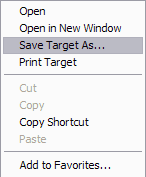
"Right click your mouse" on the blue link below. You'll
see a menu like the one to the right open up. (MAC users just click the link and hold down on the mouse button) |
2.
|
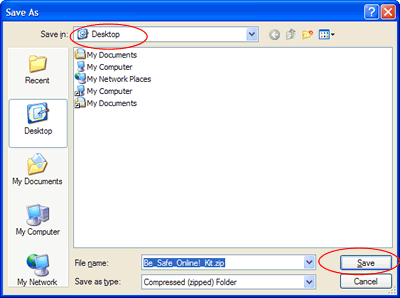
Next, select "Save Target As" and then make sure to choose "Desktop" from the drop down menu.
|
|
3. |
Click "Save" in the lower right-hand corner. |
4. |
Go to your "Desktop" and double-click the "Be_Safe_Online!.pdf" file and enjoy. |
Download Your Complimentary Copy of "Be
Safe
Online" Below:

© HONESTe Online- All Rights Reserved Worldwide |